> ## Documentation Index
> Fetch the complete documentation index at: https://developers.beta.dealroom.co/llms.txt
> Use this file to discover all available pages before exploring further.
# Authentication
> Get started in under a minute with Node.js or Python SDKs, or use raw HTTP. Create API keys, exchange credentials for Bearer tokens, and authenticate requests.
The Dealroom API supports two types of API keys:
* **Programmatic (M2M) keys** — for server-side integrations using the OAuth2 client credentials grant. Each key has a `client_id` and `client_secret`.
* **Browser app (application) keys** — for single-page apps (SPAs) using Authorization Code + PKCE. No `client_secret`; read-only permissions only. These are **not self-serve** — [contact us](mailto:support@dealroom.co) and we will provision one for you.
## Creating an API key
Programmatic keys are self-serve from the Dealroom dashboard. Browser app keys are provisioned by us on request.
### From the Dealroom dashboard
Go to [**Settings > API**](https://beta.dealroom.app/settings/api) in your Dealroom dashboard:
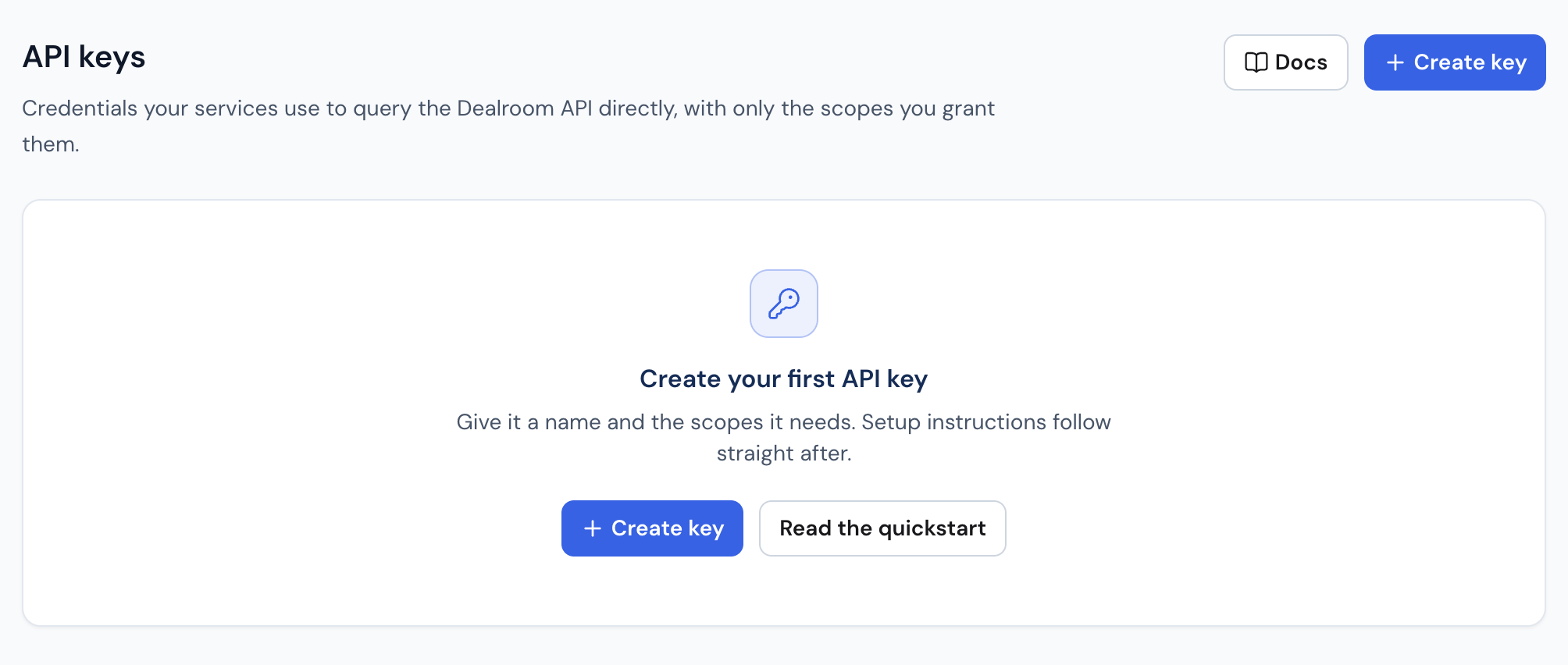 1. Click **+ Create key**.
2. Enter a descriptive name (e.g. `Production — Data Pipeline`). This is a label for you; it is not sent to the API.
3. Select the **scopes** the key should carry. You can only grant scopes your own account holds, and at least one is required. Scopes cannot be changed later — to change them, revoke the key and create another.
4. Click **Create key**.
5. Copy the `client_secret` immediately. It is shown **once** and cannot be retrieved afterwards. The `client_id` stays visible on the key's page.
There is no key-type choice in the dialog: the dashboard creates Programmatic
(M2M) keys. For a browser app key, [contact us](mailto:support@dealroom.co).
## Quick start
Install the dependencies for your language and start making API calls in under a minute.
The SDKs handle token exchange, caching, and automatic refresh — you just provide your credentials.
`bash npm install simple-oauth2 axios `
`bash pip install authlib requests `
```typescript Node.js theme={null}
import { ClientCredentials } from "simple-oauth2";
import axios from "axios";
const CLIENT_ID = process.env.DEALROOM_CLIENT_ID;
const CLIENT_SECRET = process.env.DEALROOM_CLIENT_SECRET;
// Set up OAuth2 client credentials
const oauth = new ClientCredentials({
client: { id: CLIENT_ID, secret: CLIENT_SECRET },
auth: {
tokenHost: "https://accounts.beta.dealroom.co",
tokenPath: "/oauth/token",
},
});
// Create an axios instance with required headers
const dealroom = axios.create({
baseURL: "https://api.beta.dealroom.app",
headers: {
"X-Client-Id": CLIENT_ID,
},
});
// Auto-refresh token before every request
let token = await oauth.getToken({ audience: "https://api-next.beta.dealroom.co" });
dealroom.interceptors.request.use(async config => {
if (token.expired()) {
token = await oauth.getToken({ audience: "https://api-next.beta.dealroom.co" });
}
config.headers.Authorization = `Bearer ${token.token.access_token}`;
return config;
});
// Make requests — token handling is automatic
const { data } = await dealroom.get("/data/entities", {
params: { limit: 10, sort: "-launch_date" },
});
console.log(data);
```
```python Python theme={null}
import os
from authlib.integrations.requests_client import OAuth2Session
CLIENT_ID = os.environ["DEALROOM_CLIENT_ID"]
CLIENT_SECRET = os.environ["DEALROOM_CLIENT_SECRET"]
# Set up OAuth2 client credentials — token refresh is automatic
session = OAuth2Session(
client_id=CLIENT_ID,
client_secret=CLIENT_SECRET,
token_endpoint="https://accounts.beta.dealroom.co/oauth/token",
)
session.headers.update({
"X-Client-Id": CLIENT_ID,
})
session.fetch_token(
url="https://accounts.beta.dealroom.co/oauth/token",
grant_type="client_credentials",
audience="https://api-next.beta.dealroom.co",
)
# Make requests — token handling is automatic
response = session.get(
"https://api.beta.dealroom.app/data/entities",
params={"limit": 10, "sort": "-launch_date"},
)
print(response.json())
```
```bash cURL theme={null}
# Step 1: Get a token
ACCESS_TOKEN=$(curl -s -X POST "https://accounts.beta.dealroom.co/oauth/token" \
-H "Content-Type: application/json" \
-d '{
"client_id": "YOUR_CLIENT_ID",
"client_secret": "YOUR_CLIENT_SECRET",
"audience": "https://api-next.beta.dealroom.co",
"grant_type": "client_credentials"
}' | jq -r '.access_token')
# Step 2: Make requests
curl "https://api.beta.dealroom.app/data/entities?limit=10&sort=-launch_date" \
-H "Authorization: Bearer $ACCESS_TOKEN" \
-H "X-Client-Id: YOUR_CLIENT_ID"
```
## Obtaining a Bearer token
If you prefer to handle token management yourself, exchange your credentials at the Auth0 token endpoint:
```bash theme={null}
curl -X POST https://accounts.beta.dealroom.co/oauth/token \
-H "Content-Type: application/json" \
-d '{
"client_id": "YOUR_CLIENT_ID",
"client_secret": "YOUR_CLIENT_SECRET",
"audience": "https://api-next.beta.dealroom.co",
"grant_type": "client_credentials"
}'
```
```json theme={null}
{
"access_token": "eyJ...",
"token_type": "Bearer",
"expires_in": 86400
}
```
Tokens are valid for `expires_in` seconds (typically 24h). **Cache and reuse them.** Requesting
a new token per API call is unnecessary and adds latency.
The `audience` value (`https://api-next.beta.dealroom.co`) is an OAuth2 identifier, not a URL you
call — it deliberately differs from the API base URL (`https://api.beta.dealroom.app`). Use
both exactly as written; "fixing" the audience to match the base URL makes the
token exchange fail.
## Making authenticated requests
Every request **must** include two headers:
| Header | Description | Example |
| --------------- | --------------------------------------------------- | -------------------------------- |
| `Authorization` | Bearer token from the token endpoint | `Bearer eyJhbGciOiJSUzI1NiIs...` |
| `X-Client-Id` | The `client_id` issued when the API key was created | `abc123def456` |
```bash theme={null}
curl "https://api.beta.dealroom.app/data/entities?limit=10&sort=-launch_date" \
-H "Authorization: Bearer $ACCESS_TOKEN" \
-H "X-Client-Id: YOUR_CLIENT_ID"
```
### Why two headers?
* **`Authorization`** — authenticates the request via JWT.
* **`X-Client-Id`** — cross-checked against the token's `sub` claim as an extra authenticity
guard. Must match the `client_id` used to obtain the token.
## Error responses
Missing or invalid headers return **400 Bad Request**:
```json theme={null}
{
"error": {
"code": "VALIDATION_ERROR",
"message": "X-Client-Id header is required for API key requests"
}
}
```
## Permissions
API keys support fine-grained scopes. You can only grant permissions that you already hold.
Common permissions:
| Permission | Description |
| ------------------- | ------------------------------ |
| `read:entities` | Query companies, funds, people |
| `read:investors` | Query investor profiles |
| `read:founders` | Query founder profiles |
| `read:transactions` | Query funding rounds |
| `read:valuations` | Query company valuations |
## Usage dashboard
After making API requests, the dashboard **Settings > API** page shows:
* **Total requests** — aggregated request count over time
* **Endpoint breakdown** — which endpoints are being called and how often
* **Last used** — when each key was last active
Usage data may take up to 60 seconds to appear after requests are made.
## Best practices
* **Principle of least privilege** — only grant permissions your integration needs.
* **Rotate regularly** — revoke and recreate API keys periodically.
* **Never commit secrets** — use environment variables or a secrets manager.
* **Cache tokens** — reuse the access token for its full lifetime before refreshing.
1. Click **+ Create key**.
2. Enter a descriptive name (e.g. `Production — Data Pipeline`). This is a label for you; it is not sent to the API.
3. Select the **scopes** the key should carry. You can only grant scopes your own account holds, and at least one is required. Scopes cannot be changed later — to change them, revoke the key and create another.
4. Click **Create key**.
5. Copy the `client_secret` immediately. It is shown **once** and cannot be retrieved afterwards. The `client_id` stays visible on the key's page.
There is no key-type choice in the dialog: the dashboard creates Programmatic
(M2M) keys. For a browser app key, [contact us](mailto:support@dealroom.co).
## Quick start
Install the dependencies for your language and start making API calls in under a minute.
The SDKs handle token exchange, caching, and automatic refresh — you just provide your credentials.
`bash npm install simple-oauth2 axios `
`bash pip install authlib requests `
```typescript Node.js theme={null}
import { ClientCredentials } from "simple-oauth2";
import axios from "axios";
const CLIENT_ID = process.env.DEALROOM_CLIENT_ID;
const CLIENT_SECRET = process.env.DEALROOM_CLIENT_SECRET;
// Set up OAuth2 client credentials
const oauth = new ClientCredentials({
client: { id: CLIENT_ID, secret: CLIENT_SECRET },
auth: {
tokenHost: "https://accounts.beta.dealroom.co",
tokenPath: "/oauth/token",
},
});
// Create an axios instance with required headers
const dealroom = axios.create({
baseURL: "https://api.beta.dealroom.app",
headers: {
"X-Client-Id": CLIENT_ID,
},
});
// Auto-refresh token before every request
let token = await oauth.getToken({ audience: "https://api-next.beta.dealroom.co" });
dealroom.interceptors.request.use(async config => {
if (token.expired()) {
token = await oauth.getToken({ audience: "https://api-next.beta.dealroom.co" });
}
config.headers.Authorization = `Bearer ${token.token.access_token}`;
return config;
});
// Make requests — token handling is automatic
const { data } = await dealroom.get("/data/entities", {
params: { limit: 10, sort: "-launch_date" },
});
console.log(data);
```
```python Python theme={null}
import os
from authlib.integrations.requests_client import OAuth2Session
CLIENT_ID = os.environ["DEALROOM_CLIENT_ID"]
CLIENT_SECRET = os.environ["DEALROOM_CLIENT_SECRET"]
# Set up OAuth2 client credentials — token refresh is automatic
session = OAuth2Session(
client_id=CLIENT_ID,
client_secret=CLIENT_SECRET,
token_endpoint="https://accounts.beta.dealroom.co/oauth/token",
)
session.headers.update({
"X-Client-Id": CLIENT_ID,
})
session.fetch_token(
url="https://accounts.beta.dealroom.co/oauth/token",
grant_type="client_credentials",
audience="https://api-next.beta.dealroom.co",
)
# Make requests — token handling is automatic
response = session.get(
"https://api.beta.dealroom.app/data/entities",
params={"limit": 10, "sort": "-launch_date"},
)
print(response.json())
```
```bash cURL theme={null}
# Step 1: Get a token
ACCESS_TOKEN=$(curl -s -X POST "https://accounts.beta.dealroom.co/oauth/token" \
-H "Content-Type: application/json" \
-d '{
"client_id": "YOUR_CLIENT_ID",
"client_secret": "YOUR_CLIENT_SECRET",
"audience": "https://api-next.beta.dealroom.co",
"grant_type": "client_credentials"
}' | jq -r '.access_token')
# Step 2: Make requests
curl "https://api.beta.dealroom.app/data/entities?limit=10&sort=-launch_date" \
-H "Authorization: Bearer $ACCESS_TOKEN" \
-H "X-Client-Id: YOUR_CLIENT_ID"
```
## Obtaining a Bearer token
If you prefer to handle token management yourself, exchange your credentials at the Auth0 token endpoint:
```bash theme={null}
curl -X POST https://accounts.beta.dealroom.co/oauth/token \
-H "Content-Type: application/json" \
-d '{
"client_id": "YOUR_CLIENT_ID",
"client_secret": "YOUR_CLIENT_SECRET",
"audience": "https://api-next.beta.dealroom.co",
"grant_type": "client_credentials"
}'
```
```json theme={null}
{
"access_token": "eyJ...",
"token_type": "Bearer",
"expires_in": 86400
}
```
Tokens are valid for `expires_in` seconds (typically 24h). **Cache and reuse them.** Requesting
a new token per API call is unnecessary and adds latency.
The `audience` value (`https://api-next.beta.dealroom.co`) is an OAuth2 identifier, not a URL you
call — it deliberately differs from the API base URL (`https://api.beta.dealroom.app`). Use
both exactly as written; "fixing" the audience to match the base URL makes the
token exchange fail.
## Making authenticated requests
Every request **must** include two headers:
| Header | Description | Example |
| --------------- | --------------------------------------------------- | -------------------------------- |
| `Authorization` | Bearer token from the token endpoint | `Bearer eyJhbGciOiJSUzI1NiIs...` |
| `X-Client-Id` | The `client_id` issued when the API key was created | `abc123def456` |
```bash theme={null}
curl "https://api.beta.dealroom.app/data/entities?limit=10&sort=-launch_date" \
-H "Authorization: Bearer $ACCESS_TOKEN" \
-H "X-Client-Id: YOUR_CLIENT_ID"
```
### Why two headers?
* **`Authorization`** — authenticates the request via JWT.
* **`X-Client-Id`** — cross-checked against the token's `sub` claim as an extra authenticity
guard. Must match the `client_id` used to obtain the token.
## Error responses
Missing or invalid headers return **400 Bad Request**:
```json theme={null}
{
"error": {
"code": "VALIDATION_ERROR",
"message": "X-Client-Id header is required for API key requests"
}
}
```
## Permissions
API keys support fine-grained scopes. You can only grant permissions that you already hold.
Common permissions:
| Permission | Description |
| ------------------- | ------------------------------ |
| `read:entities` | Query companies, funds, people |
| `read:investors` | Query investor profiles |
| `read:founders` | Query founder profiles |
| `read:transactions` | Query funding rounds |
| `read:valuations` | Query company valuations |
## Usage dashboard
After making API requests, the dashboard **Settings > API** page shows:
* **Total requests** — aggregated request count over time
* **Endpoint breakdown** — which endpoints are being called and how often
* **Last used** — when each key was last active
Usage data may take up to 60 seconds to appear after requests are made.
## Best practices
* **Principle of least privilege** — only grant permissions your integration needs.
* **Rotate regularly** — revoke and recreate API keys periodically.
* **Never commit secrets** — use environment variables or a secrets manager.
* **Cache tokens** — reuse the access token for its full lifetime before refreshing.